Verify setup
Three checkpoints sit between "I added my key to .env.local" and "I'm ready for a real run" — a free API Setup Check that probes each provider without sampling any tokens, a fully mocked Dry Run that costs nothing, and a small Minimal API Test that exercises real provider calls on a fixed 5-paper set. All three are UI-driven and live in the Control Panel's System Tests section, which is collapsed by default.
You'll also get your first look at Aparture's review gates on these runs, which is useful: they're where you'll be spending most of your attention during real daily use.
Getting to the tests
- Start the dev server:
npm run dev - Open
http://localhost:3000in a browser. - Enter the value of
ACCESS_PASSWORDfrom your.env.local. - In the Control Panel, click System Tests to expand the collapsed section. You'll see three cards — API Setup Check, Dry Run Test, and Minimal API Test — with a Check API Setup, a Run Dry Test, and a Run API Test button (the API Test button stays disabled, reading Run Dry Test First, until the Dry Run completes).
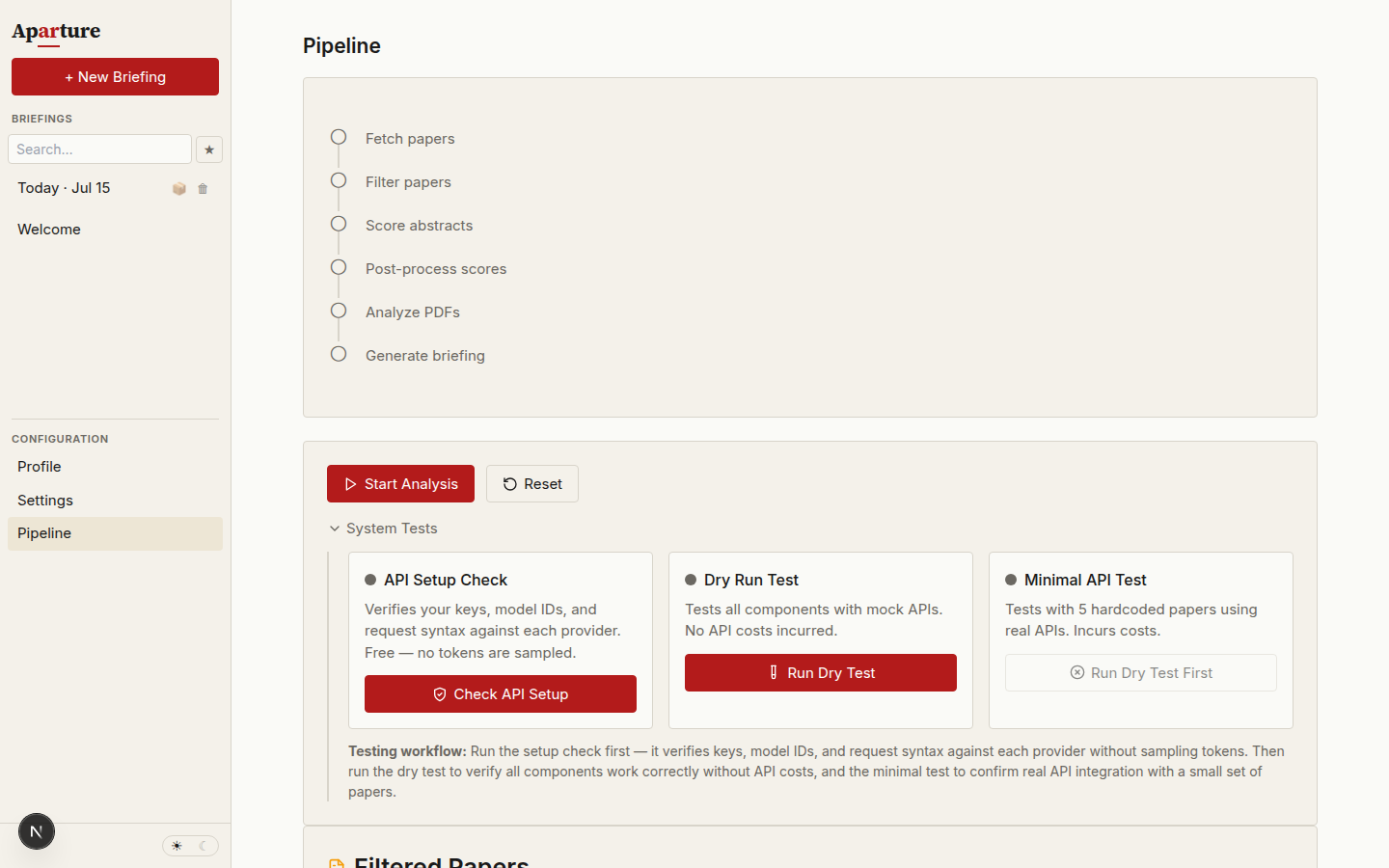
The System Tests section expanded. The Minimal API Test stays locked until a Dry Run has completed.
Step 0: API Setup Check (free)
The Check API Setup button probes each provider you've configured, without sampling a single token. It reads every configured model slot (filter, scoring, post-processing, PDF analysis, briefing, quick summaries, podcast), dedupes slots that share a model, and runs one free probe per unique provider/model pair.
What it validates
- Anthropic. The probe sends a complete Messages request, built by the same adapter the pipeline uses (structured-output schema and thinking setting included), to the
count_tokensendpoint. That endpoint returns the same 400/401/404 errors a real call would, so the key, the model ID, and the exact request syntax all get checked. Nothing is billed. - Google. The probe sends the adapter's message contents to the
countTokensendpoint, which validates the key, the model ID, and the message syntax for free. - OpenAI. OpenAI has no count-tokens endpoint. The probe fetches the model's metadata, which verifies the key and the model ID; request shape is only exercised by the Minimal API Test below.
Each slot's result row shows three checks — Key, Model, Syntax — with the provider's own error message on failure. A — means that check isn't validated by the probe (OpenAI's Syntax column, for example).
What it does not validate
- OpenAI request shape. See above — run the Minimal API Test for that.
- Billing state and quota. A key can authenticate here and still fail a real call with
429 insufficient_quota. The Minimal API Test surfaces that. - Provider latency, rate-limit behaviour, PDF downloads, or output parsing — those need real calls.
If a check fails, the fix is almost always in .env.local (key value) or Settings (model slot). Restart npm run dev after editing .env.local, then re-run the check.
Dry Run
The Dry Run pipes a real arXiv fetch through a fully mocked LLM stack. It's the cheapest way to confirm that the UI renders correctly, that the pause gates fire where they should, and that your local environment isn't silently broken — without burning any provider credit.
What it validates
- arXiv connectivity. Stage 1 genuinely queries arXiv to get today's papers in your configured categories. If the arXiv API is down or your network is blocked, the Dry Run surfaces it here.
- End-to-end UI flow. Every pipeline stage (fetch → filter → score → PDF analysis → briefing) renders correctly, and the filter-override pill, star/dismiss controls, and Download Report card all wire up.
- Mock response parsing. JSON parsing, schema validation, and the malformed/missing-field/wrong-type correction loops.
- Error recovery. Retry logic, correction prompts, failure escalation.
- Pause gates. The Stop button, plus the
pauseAfterFilter,pauseBeforeDeepAnalysis, andpauseBeforeBriefinggates that fire by default.
What it does not validate
- API keys, billing, or provider latency — all LLM calls are mocked.
- PDF download and reCAPTCHA handling — Stage 4 is entirely mocked, so the real arXiv PDF fetch path doesn't run.
- Real briefing quality — the synthesized briefing on a Dry Run is gibberish by design.
What to expect
You'll see:
- A TEST MODE badge (yellow) on the briefing card once the run reaches it.
- TEST DATA badges on the filter results, analysis results, and Download Report cards.
- Status messages stepping through each stage:
"Mock filter batch 1/10","initial-scoring","Mock PDF API Call N","Generating briefing...". - Intentional failure scenarios cycling through the test data — expect to see
"Mock parse failed: Response is not an array"followed by"Mock correction 1/3 succeeded"at least once. These aren't real errors; they're there to exercise the retry path. - A green checkmark on the test card when it finishes.
⚠️ You'll need to click through three review gates
Aparture ships with pauseAfterFilter, pauseBeforeDeepAnalysis, and pauseBeforeBriefing all on by default, so the pipeline will stop three times during the Dry Run and wait for you:
- After filtering — the UI shows three buckets (YES / MAYBE / NO). Click any verdict button to cycle a paper between buckets if you want to; then click Continue to scoring → at the top of the main area.
- After scoring, before PDF analysis — the scored list appears with star and dismiss controls for adjusting which papers get PDF-analysed. Click Continue to PDF analysis →.
- After PDF analysis, before briefing synthesis — you can star or dismiss any paper, or add a comment. Then click Continue to briefing →.
If the pipeline looks stuck, check whether it's actually waiting for you at one of these gates. You can disable any gate in Settings → Review & confirmation, but leaving them on is the realistic first-run experience.
If it fails
No real API calls happen here
Dry Run failures are always code or environment issues, never API-related. If something breaks during a Dry Run, the cause is local.
Common causes:
| Symptom | Likely cause | Fix |
|---|---|---|
| Button stays disabled or greyed out | Another test is already running | Wait, or reload the page |
| Pipeline halts at "fetching" indefinitely | arXiv API unreachable | Check your connection. Retry after a minute. |
| "Dry run test was cancelled" | You clicked Stop | Re-click Run Dry Test |
| "Dry run test failed: Mock retries exhausted" | Code or fixture bug | Check browser console for stack trace; see troubleshooting |
| No TEST MODE badges appear | React state not updating | Hard-refresh (Ctrl-Shift-R); if persistent, restart npm run dev |
Minimal API Test
The Minimal Test button unlocks only after a successful Dry Run — the enforcement is deliberate, since running real API spend against a broken UI gets expensive fast. Where the Dry Run validates everything except the provider side, the Minimal Test validates everything the Dry Run skipped.
What it validates
- API key authentication. A missing key surfaces as
no API key for <provider>, which names the variable to set; a bad one as the provider's own authentication error. - Billing and quota. Insufficient credits or hit quotas return
402or provider-specific errors. - Provider latency, rate limits, and the retry path. Real round-trip times; the pipeline's backoff behaviour if you're throttled.
- Real LLM response parsing. The provider's output actually parses against Aparture's schemas, including structured-output (tool_use / responseSchema / response_format).
- arXiv PDF download and reCAPTCHA handling. The 5 test papers have real arXiv
pdfUrls, so Stage 4 exercises the download path end-to-end — including the Playwright fallback if arXiv returns a reCAPTCHA. This is genuinely the first time PDF fetch gets validated. - Prompt caching. On Anthropic and OpenAI, you'll see cache write/read metrics in the terminal log after the first call.
What it does not validate
- arXiv abstract fetching. The 5 test papers are hardcoded with their abstracts inline; Stage 1's
fetchPapers()call is skipped on this test. PDF URLs are still fetched live from arXiv, but the paper list itself is a fixture.
What to expect
Cost: ~$0.20–$1 on paid tiers depending on your model choices, since the PDF analysis stage downloads and reads all 5 papers in full. Google's free tier covers the whole run at $0 if every slot is a free-tier Flash model.
You'll see:
- Status messages:
"Starting minimal test with real API calls","Filter batch 1/1","initial-scoring","pdf-analysis","synthesizing", and finally"Minimal test completed successfully". - No TEST MODE badges — the run makes real API calls on a fixed set of five papers. Aparture still files the briefing as a test run, and any feedback you give during it is tagged as test feedback, so it never reaches your profile suggestions.
- A timestamp on the test card showing when it last completed.
Open the terminal where npm run dev is running to watch the real-time log:
Sending request to Google: { model: 'gemini-3.5-flash-lite', promptLength: 4821, structured: true }The line names the provider's model ID and adds cacheable: true or hasPdf: true only when they apply.
Cache-hit metrics on Anthropic and OpenAI show as [anthropic cache] read=N create=N lines. A read value greater than 0 on call 2+ means caching is working.
⚠️ You may need to manually override the filter results
The 5 test papers are machine-learning classics: Word2Vec, Adam, U-Net, the original Transformer paper, and Mamba. Depending on how narrow your profile is, the filter may route all or most of them into the NO bucket — and if YES and MAYBE both end up empty, scoring and PDF analysis have nothing to work on.
When the pipeline pauses at the filter-review gate:
- Look at the three buckets. If YES + MAYBE together are empty or sparse, you'll need to intervene.
- Click any paper's verdict button to cycle it through YES → MAYBE → NO. Each click records a
filter-overrideevent. During a test run the event is tagged as test feedback and kept out of profile suggestions; in daily runs the same event tells the refinement flow what your profile got wrong. - Aim for at least 2–3 papers in YES or MAYBE so the rest of the pipeline has something to chew on.
- Click Continue to scoring → once you're happy with the buckets.
This is also your first encounter with the filter-override mechanic, which becomes part of the feedback loop that powers profile refinement. The gate itself is controlled by pauseAfterFilter in Settings → Review & confirmation; which verdicts advance to scoring is controlled by the Categories to Process checkboxes under Advanced Options → Filter Options.
If it fails
The error surface here is real — most failures indicate a real issue with keys or billing.
| Symptom | Likely cause | Fix |
|---|---|---|
Filter batch 1 failed: … Invalid password | Password mismatch in .env.local | Verify ACCESS_PASSWORD, restart npm run dev |
… no API key for <provider>, or the provider's authentication error | Missing or bad API key | Verify the key, restart npm run dev. See the relevant API keys page |
429 insufficient_quota (OpenAI) | No credit balance | Add $5+ at Settings → Billing. See OpenAI keys |
429 rate_limit_exceeded | Provider throttled your request | Wait 60s; pipeline retries with backoff. Move to higher tier if persistent. See troubleshooting |
402 / billing_error (Anthropic) | Billing issue or unpaid invoice | Log into console, fix billing |
| Google refuses one model while the others work | A model the project can't use: Gemini 4 Argon without billing, or a legacy Gemini 2.5 model on a new project | Set up billing for Argon, or switch the affected slots to a current Flash model in Settings |
Failed to download PDF: HTTP 403 / reCAPTCHA detected | arXiv blocked a PDF download | Expected occasionally. Install Playwright for the fallback path, or accept abstract-only ranking for this run. See install |
Initial parse failed: JSON.parse error | Provider returned malformed JSON | Often retries cleanly. If persistent, the model is struggling with the schema — try a different scoring model |
| Hangs on "Filter batch 1/1" with no terminal output | Route stuck; network blocked; firewall | Check terminal for provider error. Try a curl smoke test from the provider page |
Deep dives for each of these live on the troubleshooting page.
What success looks like
When both tests pass:
- The Dry Run card shows a green check and
"Dry run test completed successfully". - The Minimal Test card shows a green check, a last-run timestamp, and
"Minimal test completed successfully". - The main area renders a small Briefing — the in-app reading view with themes, per-paper cards, and an executive summary, same as you'd see on a real run. Content is obviously uninteresting (5 classic ML papers, a narrow set of themes) but its presence proves the synthesis pipeline works.
- The Download Report card offers a separate markdown export of the same run. Briefing and report are two different outputs: the Briefing is what you read in the UI, the Report is what you save to disk if you want a standalone file.
- The terminal log shows a clean sequence of
Sending request to ...lines per stage, no red errors, and no repeatedAPI error 429or validation-failed messages.
Your environment is solid. When you're ready to run the pipeline on your own profile and produce a real briefing, continue to the Guide: Your first briefing →.