Refining over time
Once you've marked a decent amount of feedback — stars, dismisses, comments, filter overrides — your profile will usually be due for an update. Rather than rewriting it by hand, you can hand the accumulated feedback to a flow that proposes profile edits. It reads your current profile plus everything you've marked, and returns a list of small, targeted changes, each with its own rationale. You pick which ones to apply.
This page covers that flow: what it sees, what the review step looks like, the per-call guidance field, and when it's worth running.
The loop in one sentence
Read a briefing → react (stars, dismisses, comments, filter overrides) → let feedback accumulate → click Suggest improvements → → review the proposed changes one at a time → accept any subset → the next briefing uses the revised profile.
Most of the detail below is about the review step, because that's where the decisions happen.
What the flow sees
The Suggest improvements → button lives in two places — at the top of the Feedback panel beneath every briefing, and in its own card on the Profile page — and both open the same dialog. The dialog lists every pending feedback event (anything not yet incorporated into your profile) with checkboxes, so you can include or exclude specific events. All are included by default. Feedback from test runs is never listed.
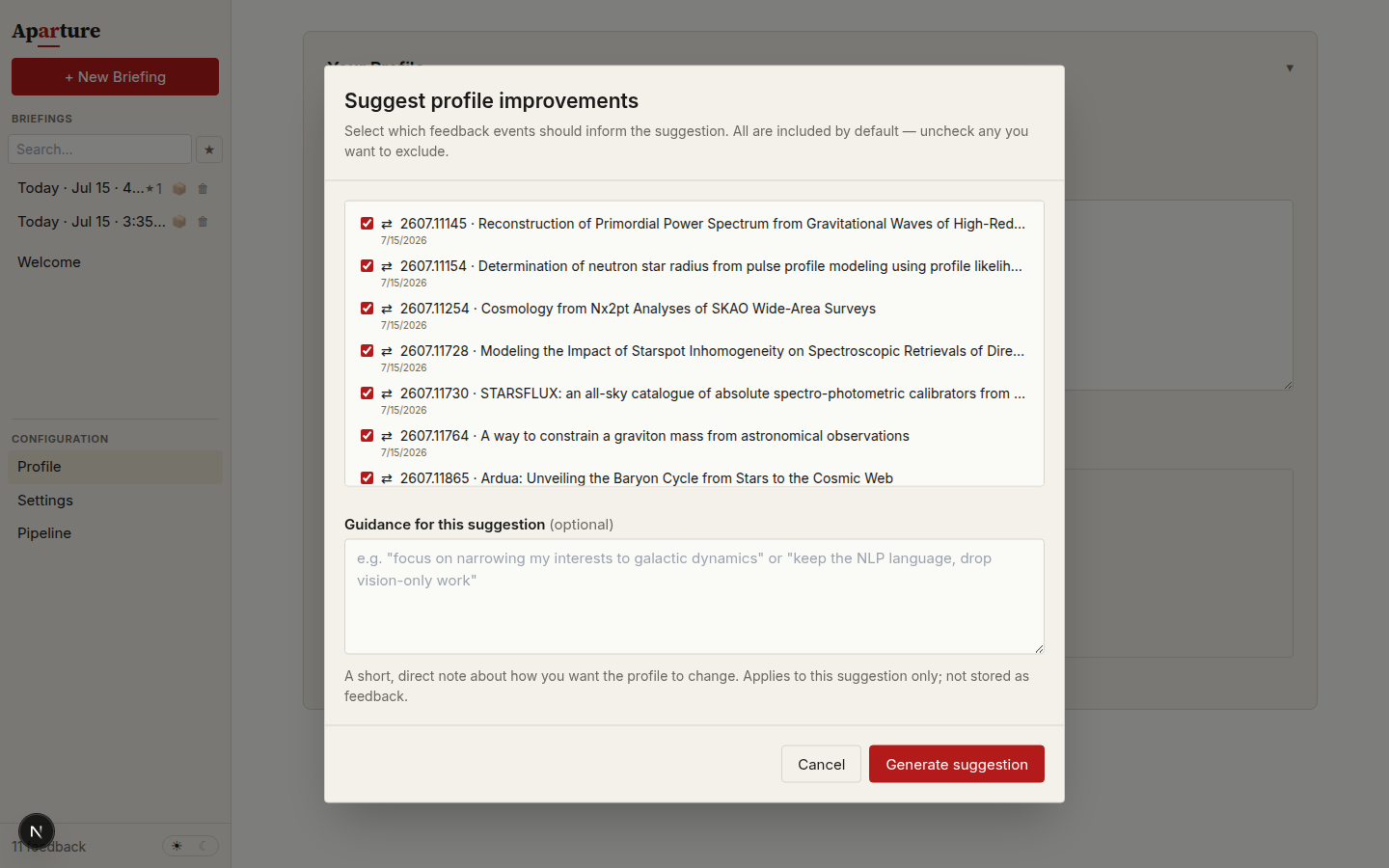
The suggestion dialog before generating: every pending feedback event is listed with a checkbox, and the guidance field steers this one suggestion without being stored.
When you click Generate suggestion, the model receives:
- Your current profile text.
- Every paper you've starred or dismissed — the current state per paper, so if you starred then un-starred a paper, the model only sees that it's un-starred.
- Every paper with a filter override — the current verdict plus what the override signals (too narrow or too broad). When a paper also has a paper comment from the same run, the two are presented as a single combined block: "overrode NO → YES, with comment: [your rationale]". This pairing gives the model cleaner context than either signal alone.
- Your most recent paper comments — capped at the most recent 30. If the cap fires, the dialog shows an amber notice naming how many older comments were dropped.
- Your most recent general comments — same 30-item cap. Each one is paired with the briefing it was written against (executive summary, theme titles and arguments, and per-paper pitches), so the model can interpret reactions like "this one leaned too heavily on interpretability" with the right context.
- Scoped feedback (bucket-level, score-review, and run-level observations), grouped by
briefingDate. These appear as three labelled sections in the prompt —BUCKET-LEVEL OBSERVATIONS,SCORE-REVIEW NOTES, andRUN-LEVEL OBSERVATIONS— so the model knows which scope each note belongs to and can weight run-level patterns accordingly. Filter-override events and scoped-feedback events are passed through uncapped (both are latest-wins or have no natural numeric accumulation). - Your answers to the editor's questions, uncapped, in a section of their own (
ANSWERS TO THE EDITOR'S QUESTIONS), each with the question and the papers that prompted it. An answer is you settling an ambiguity the day's papers exposed, which makes it one of the most direct signals the flow sees. - The changes you rejected in earlier rounds, the 10 most recent, in a section that tells the model not to propose them again unless the new feedback gives a reason.
- Any per-call guidance you type in (see below).
The model's job is to read these signals and propose surgical edits that align your profile with what the feedback suggests you actually want.
Automatic proposals
You don't have to remember to click Suggest improvements. After a real briefing (not a Dry Run or Minimal Test), Aparture checks whether your pending feedback adds up to something worth a look, and if it does, asks the briefing model for proposals in the background. When it finds any, a card under the briefing says how many; Review proposals opens the same review dialog, with nothing changed until you accept.
What adds up: a star, dismissal, or filter override counts 1 point, a comment 2, and an answer to one of the editor's questions 4. A round runs when feedback no earlier round has weighed reaches 4 points across at least two briefings, or includes an answer (the editor asked that question to settle something, so the answer can act on its own). The two-briefing rule keeps one unusual day from driving an edit. No new round starts while earlier proposals still wait for you, and a round that finds no pattern shows nothing and doesn't weigh the same feedback again.
Each round is one call on the briefing model, about what a manual Suggest improvements costs. Turn it off under Settings → Review & confirmation ("Propose profile changes after a briefing…").
Per-call guidance
Above the Generate suggestion button sits a small text field labelled "Guidance for this suggestion (optional)". It's the place to type a short, direct note about how you want the profile to change on this one call — examples that work:
- "Focus on narrowing my astro interests to galactic dynamics specifically."
- "Keep the NLP language, drop the vision-only work."
- "Add a line about preferring methodological papers over applications."
When you fill this in, it becomes the highest-priority signal the model sees, and it's told to use the feedback events beneath it to ground concrete changes that move the profile in the direction you asked for. Leave it empty and the flow runs from feedback signals alone.
Guidance isn't stored anywhere. It applies to this one suggestion and disappears when the dialog closes. If you want a persistent note, leave a general comment in the Feedback panel instead.
Suggested changes, not a rewrite
The output isn't a new profile. It's a list of atomic, non-overlapping changes, each with:
| Field | What it holds |
|---|---|
| Edit type | replace, insert, or delete. |
| Anchor | An exact substring from your current profile that the change targets. |
| Content | The new text (for replace and insert). Empty for delete. |
| Rationale | A short line explaining why, usually citing specific feedback events by arXiv ID. |
Changes are guaranteed non-overlapping — if two candidate edits would touch adjacent text, the model merges them into one — so you can accept any subset and the result is still well-formed. The API validates this server-side and retries once if the model returns overlapping edits.
The review dialog
When suggestions come back, the dialog swaps to a per-change review. Top to bottom:
Change cards
Each proposed change renders as a card with a checkbox (checked by default), a small label showing the edit type, a diff preview, and the model's rationale below.
The diff preview uses the colour conventions used elsewhere in the app: the anchor text in red (with a strikethrough if it's being deleted or replaced), the new text in green. For inserts, the anchor is shown as grey "after: …" context because the anchor itself isn't being touched — the new content is going in right after it.
Proposed editorial notes appear as cards of their own: Add a writing note, Revise a note (the old text struck through above the new), or Retire a note. They are ticked and applied the same way, and the cumulative preview shows only the profile text.
Rationales tend to look like "You starred three papers on mixture-of-experts routing and dismissed two on sparse attention; this adds MoE to your active topics and removes sparse attention." Read them. Uncheck anything whose reasoning you don't buy.
Cumulative preview
Below the cards sits a live preview showing the profile you'd end up with from your current selection, in serif prose the way the LLM will read it. Check and uncheck cards and the preview updates in real time.
TIP
The cumulative preview is the thing to watch here — it's the only place that shows the final profile as a whole. If it looks wrong as you toggle changes (a paragraph has disappeared, an anti-interest line reads oddly, the structure has drifted), adjust the checkboxes until it reads the way you want.
Apply
The Apply button at the bottom reflects your current selection — Apply 3 of 5 changes, and so on. Select all and Select none helpers sit next to it. Clicking Apply commits the cumulative preview as your new profile and archives the previous version in history with a rationale composed from the accepted changes' rationales.
The changes you leave unticked count as rejected. Aparture remembers them and lists them in the next suggestion request, so the model doesn't keep proposing an edit you've already turned down. If you untick everything, a Reject all N changes button appears, and clicking it records the rejection. Cancel closes the dialog without deciding anything.
The Suggest improvements card on the Profile page keeps a running tally: "Suggested changes so far: 7 accepted, 3 rejected (70% accepted)." If most suggestions get rejected, write guidance for the next call, or a general comment that says what you want, rather than rerunning the flow on the same feedback.
Which feedback counts as used
After you apply or reject, Aparture marks as incorporated only the feedback behind the changes you accepted. It works this out from each accepted change's rationale: a star, dismiss, paper comment, or filter override counts when the rationale names its paper by arXiv ID or full title, and a general comment or note counts when the rationale quotes it. A note the rationales don't quote still counts if you accepted at least one change, unless a rejected change quoted it. An answer to one of the editor's questions counts as used whenever you accept at least one change.
Everything else stays pending: events you unticked before generating, events behind the changes you rejected, and all of them after a "no change" result. Pending feedback is offered again the next time you run the flow, where it can add up to a pattern.
"No clear change": when feedback is ambiguous
Sometimes the model can't find a clear improvement. When that happens, the dialog shows a single "No profile changes suggested" panel with a short explanation — a noChangeReason — rather than a change list.
This usually comes up when:
- Your feedback is too sparse. A handful of events don't give the model much to work with.
- Your feedback is contradictory. You starred one paper on a topic and dismissed another on the same topic, so the signal is unclear.
- Your profile already captures the signal. The papers you dismissed were already excluded by your anti-interests; there's nothing to change.
Close the dialog, keep giving feedback (or refine the guidance note), and try again once there's more signal. The feedback you sent stays pending.
Versioned history and rollback
Every accepted suggestion creates a new entry in your profile history, tagged suggested to distinguish it from a manual edit. The entry archives the text from before the change.
To browse history, expand the History control under the profile text box on the Profile page. Each entry is one change: a timestamp, a source tag, how many lines it added and removed, and its rationale. For a suggested change, the rationale collects the edits you accepted, and the entry says how many of the proposed edits that was ("3 of 5 changes accepted"). Click an entry to see what it changed, line by line, then Revert to put back the text from before it.
Reverting is safe: your current profile is itself archived before the earlier text is restored, so you can always flip back. Reverting also undoes the bookkeeping: feedback incorporated by the revisions you reverted past becomes pending again, so the next suggestion can use it. The history keeps the last 20 revisions; a Clear history button wipes old revisions without touching the current profile. See Writing a good profile → Versioned history and rollback for the full mechanics.
When to run it
The flow works best when the feedback store has enough signal to spot patterns, not at any particular cadence. Check the count at the top of the Feedback panel — events not yet incorporated into your profile — and use roughly this guide:
| Aggregate volume | What to expect |
|---|---|
| Fewer than ~10 pending events | Usually too thin — expect "no clear change" or vague proposals. |
| ~10–30 pending events, mixed types | Enough for concrete, defensible edits, especially with a few comments. |
| 30+ pending events including comments | Rich enough to cite specific reactions and recommend targeted edits. |
This isn't a calendar thing. A heavy first-day session — a dozen filter overrides, half a dozen stars, a general comment or two — is enough to run the flow right away; two quiet weeks of barely-engaged briefings might not be.
Two other triggers worth knowing about:
- When a briefing feels off. If you've just read a briefing that missed papers you care about or included papers you don't, your reactions are fresh and specific. Often a good moment to run the flow, especially if you can combine it with a direct guidance note.
- After a shift in research focus. Starting a new project or moving to a new field usually needs 3–5 briefings of feedback on the new focus before the flow has enough to work with. A guidance note can help accelerate this — "shifting focus to protein structure prediction; integrate this into the profile" — but a single session of feedback still isn't much for the flow to work with.
A sanity check before accepting
Before you click Apply, run the cumulative preview through a quick pass:
- Does the profile still describe you, or has it drifted toward describing what the tool happened to surface this week?
- Are the anti-interests still honest? Anti-interests tend to drift faster than positive interests because feedback is mostly about what you liked, not what you didn't.
- Is the profile still a reasonable length (150–300 words)? Occasionally the flow will balloon the profile if the feedback is heavy on comments.
- Would a collaborator reading this profile recognise your research?
If any of those feel off, uncheck the responsible cards — or close the dialog and make the edit by hand.
Limits
A few things the flow won't do:
- Write your first profile. If the current profile is very thin, proposed changes will be too. Write a real profile manually first (see Writing a good profile), then run refinement once you've given feedback on it.
- Know about papers it hasn't seen. The flow only reads the papers you've reacted to inside Aparture plus your comments and overrides. Stars on arXiv itself don't reach it.
- Re-offer changes you rejected. If you apply 3 of 5 and later want the other 2, there's no "apply the rest". The 2 you left unticked are remembered as rejected, so the flow won't propose them again without a new reason. Make those edits by hand.
Next
Review gates → — with a sense of how feedback flows back into the profile, you can decide whether the three pause gates during a run still earn their keep for you.
Also worth reading:
- You've refined your profile and want to tune the rest of the pipeline. → Tuning the pipeline
- A reminder of what each feedback type contributes. → Giving feedback
- You're reading an old briefing and want to see which profile produced it. → Reading a briefing → Generation provenance