
Guides / Choose bins
Choose bins
The bins are part of the model. The model takes the population to be flat within each bin, so the bins decide which shapes the fit can follow. This page says where to put the bins, how many to use, and how to check the choice.
Where to put them
Cover the data. Every object’s likelihood should lie mostly inside the bins. If many do not, binference warns (Gaussian measurements). Widen the range rather than dropping objects.
Pick the coordinate. For a quantity that spans decades, such as a mass or a flux, use
Bins.log: the population is then flat in \(\log z\) within each bin. The measure sets this (Advanced input options).Unequal bins are fine. If you use them, say whether your inputs are masses or densities (Likelihood tables).
Categories need no choice. Classes, stocks and species are their own bins.
How many
Too few bins and too many bins cause different errors.
- Too few bins
A bin wider than a feature of the population hides the feature. Worse, it biases the fractions: the bin-averaged likelihood weights the wrong parts of the bin. This binning bias does not shrink as objects are added, while the error bars do.
- Too many bins
Each bin then holds few objects’ worth of data. Its fraction is set by the prior more than by the data, and the fractions of neighbouring bins are strongly anti-correlated. The cost of a fit also grows with the number of bins.
A good default is bins no wider than the features you care about, and no narrower than
the typical measurement error. If you need narrower bins, add a smoothness prior
(Choose a prior). Report coarse summaries as functions of the fine fit, with
result.rebin and result.functional (Read a result).
What binning bias looks like
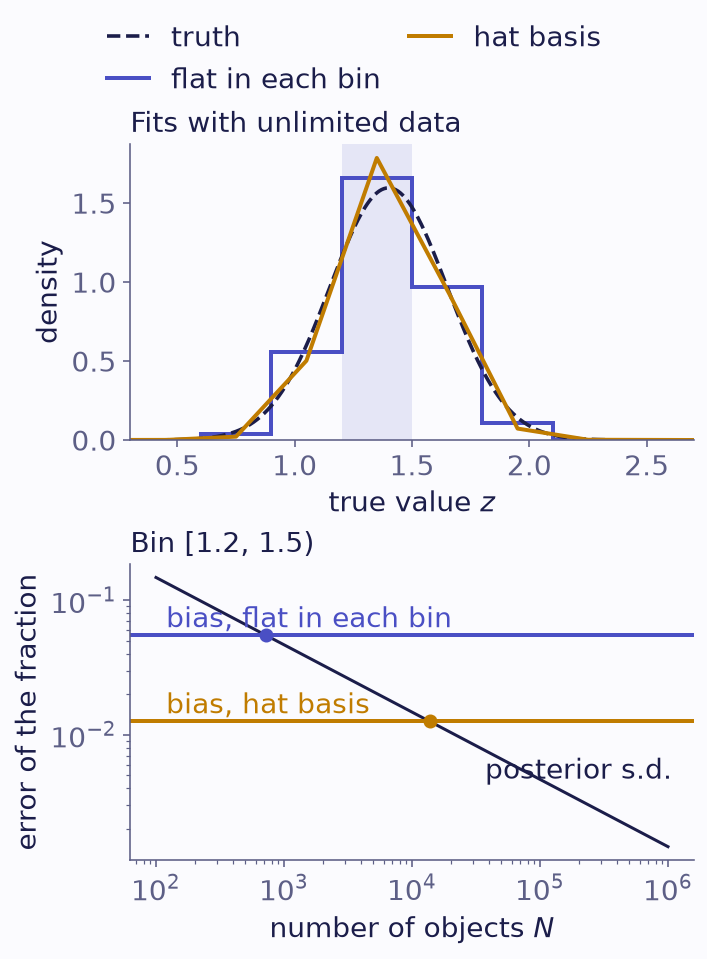
Binning bias for a population with a peak 0.25 wide, ten bins 0.3 wide, and Gaussian errors of 0.2. Top: the fits with unlimited data, flat in each bin (steps) and on hat components (Basis(bins, order=1)), against the truth (dashed). Bottom: in the shaded bin, each fit’s bias against the posterior s.d. of the flat fit, measured on 20,000 objects and scaled as \(1/\sqrt N\). Where the lines cross, the bias equals the error bar.
The bias is largest where the population curves most within a bin. Here it equals the error bar at about 700 objects. Beyond that, adding objects makes the answer more precise but no more accurate. Hat components follow the curve within each bin, and their bias is 4 times smaller. Narrower bins with a smoothness prior reduce it further.
Check the binning
Two checks on a fitted result tell you whether the bins suit your data.
Binning bias. result.binning_bias() refits the same data on hat components over
the same bins. For each bin it reports the shift of the mean fraction, the fit’s
posterior s.d., and their ratio, in column z. It warns when \(|z|\) exceeds its threshold in any
bin. Gaussian likelihoods rebuild themselves. For other inputs, pass build, a
function that returns your data’s likelihoods on the bins or basis it is given.
bins = binference.Bins.linear(0.0, 3.0, 10)
mock = binference.simulate.mock_1d(5000, bins, density=peak, noise=0.2, rng=3)
result = binference.infer(mock.likelihoods, method="laplace", n_proposals=40000, rng=1)
check = result.binning_bias(rng=2, n_proposals=40000)
print(check)
binference binning bias (basis of order 1, laplace)
       bin      shift         sd        z  n_crit
  [0, 0.3)  8.718e-05  0.0002927   0.2979     inf
[0.3, 0.6)   0.001186  0.0008085    1.467     inf
[0.6, 0.9)     0.0102   0.005331    1.913     inf
[0.9, 1.2)    0.01562     0.0153    1.021     inf
[1.2, 1.5)   -0.04257    0.02177   -1.955     inf
[1.5, 1.8)  -0.007997    0.01779  -0.4495     inf
[1.8, 2.1)    0.02177   0.007602    2.864   609.4
[2.1, 2.4)   0.001476   0.001779     0.83     inf
[2.4, 2.7)  0.0001826   0.000498   0.3667     inf
  [2.7, 3)  3.448e-05  0.0002427   0.1421     inf
/tmp/ipykernel_2674/1247510587.py:4: InputWarning: Binning bias: 1 bins move by more than 2 posterior s.d. on a basis of order 1 (first: [6]); fit with binference.Basis(bins, order=1) or narrower bins.
  check = result.binning_bias(rng=2, n_proposals=40000)
Here bin [1.8, 2.1) (z = 2.9) is flagged. The peak bin [1.2, 1.5) is not: its shift of -0.043 is 1.95 times its posterior s.d. of 0.022, inside the threshold.
For a flagged bin, n_crit is the number of objects at which the shift equals the
statistical error. Run the check on a pilot sample to learn how many objects these bins
can take. If bins are flagged, fit on binference.Basis(bins, order=1), or use
narrower bins with a smoothness prior.
Data support. result.data_support is each bin’s data support: its
objects’ worth of likelihood. A bin with less than about one object’s worth is
set by the prior. The summary shows it as support, and result.check(support_min=1)
flags such bins.
print(result.data_support.round(1))
[ 10. 84.9 383.6 1014.2 1520.3 1253.4 570.8 141.2 19.9 1.8]
If the outer bins have little support, merge them or narrow the range. To compare two
binnings directly, score each fit on held-out objects with result.log_predictive
(Read a result).
The theory behind the bias is in binning is a modelling choice.