Giving feedback
Feedback is how Aparture learns what you actually care about. Small signals — stars, dismisses, short notes on papers, corrections on filter verdicts, general comments on a briefing, observations about a scoring round — build up quietly as you use the tool. Later, you can hand them to a flow that proposes edits to your profile: it reads everything you've marked and suggests specific changes, which you accept or reject per change. None of this is required for usable briefings on day one, but it's the main way the system evolves past your starter profile.
This page walks through the seven feedback types, where each one appears in the interface, when they take effect relative to the briefing, and how much feedback you typically need before the refinement flow is worth running. For worked examples of good and bad usage of each type, see Feedback in practice; the related page on refining over time covers the refinement step itself.
The seven feedback types
★ Star
"This one matters to me." — but the meaning shifts depending on when you give it.
- At Gate 2 (score-review, before PDF analysis) — guarantees this paper gets PDF-analysed, regardless of where its score sits. Pull borderline papers up, or rescue a paper the scorer underestimated.
- At Gate 3 (pre-briefing) or on a rendered briefing — tells synthesis you liked this paper; it gets more attention in the editorial treatment and anchors themes.
Both are stored as star events. The timing determines whether the star is a "read this" instruction or a "this is good" signal — the refinement flow uses whichever meaning is appropriate based on context.
⊘ Dismiss
"This one isn't for me."
- Before a briefing writes — the paper gets deprioritised in the treatment. At Gate 2 it also removes the paper from the PDF set entirely.
- After the briefing's rendered — accumulates as a "profile might be too broad here" signal for the refinement flow.
💬 Paper comment
A short note about one specific paper.
- Before a briefing writes — the briefing writer reads it with that paper and works it into the paper's why it matters paragraph.
- After the briefing's rendered — feeds the refinement flow, where paper-grounded reactions are among the strongest signals it sees.
- At Gate 1 (filter review) — you can leave a comment on a filter row without changing its verdict. Click the 💬 button to open the text box; the paper stays in whatever bucket the filter assigned it.
💭 General comment
A profile-level note tied to the briefing you were reading. Lives in the Feedback panel beneath the briefing.
- Works as direct intent: "I'm shifting focus to Bayesian methods", "stop recommending vision-only papers".
- Also works as a reaction to a briefing: the refinement flow sees the comment alongside what was in the briefing at the time.
- At Gate 3 (pre-briefing) — a note left there goes to the briefing writer as an instruction for that run ("Lead with the diffusion-models cluster"). It is saved as a general comment too, so the refinement flow sees it later.
⇄ Filter override
A correction on the filter's verdict for a specific paper, made on the filter results: at Gate 1, the pause after the filter runs, or any time after the run ends.
- NO → YES: profile might be too narrow on that kind of work.
- YES → NO: profile might be too broad there.
📋 Scoped feedback
An observation attached to a bucket, a scoring round, or an entire run — not to any individual paper.
Three scopes:
- bucket — a comment on a filter-review bucket (e.g. "the MAYBE bucket is full of tangential CV papers"). Attached to the YES / MAYBE / NO group you're looking at.
- score-review — the free-text "feedback on this scoring round" field at Gate 2. For observations about the scoring spread or batch composition as a whole.
- run — a general note about the entire run, separate from the per-briefing general-comment.
Each scope has a distinct dedupe key (scope + briefing date). If you leave two score-review notes for the same run, the second one replaces the first — latest-wins per scope. These show up in the refinement prompt as labelled sections grouped by date, giving the model the context it needs to act on run-level patterns.
✓ Answer
Your reply to one of the editor's questions at the end of a briefing (see Reading a briefing → Notes from the editor).
- One tap records it. Tapping a different answer replaces it, and tapping the chosen answer again takes it back.
- It reaches the refinement flow as evidence in its own section, next to the papers that prompted the question.
All seven feed the same local feedback store. When you run the refinement flow, it reads everything in the store when deciding what to propose.
Where each one appears
Paper cards carry star, dismiss, and comment buttons
Any paper card in Aparture has three controls: ☆ star, ⊘ dismiss, and + comment. You'll run into them in two places:
- Analysis Results list (Pipeline view). As soon as the PDF-analysis stage finishes, each card is fully interactive — you don't have to wait for the briefing to write before marking papers.
- Paper cards inside a briefing. Same three controls in the rendered briefing. The briefing itself was written from whatever signals existed when synthesis ran, so marking papers here doesn't change what you're reading — the feedback feeds the refinement flow instead.
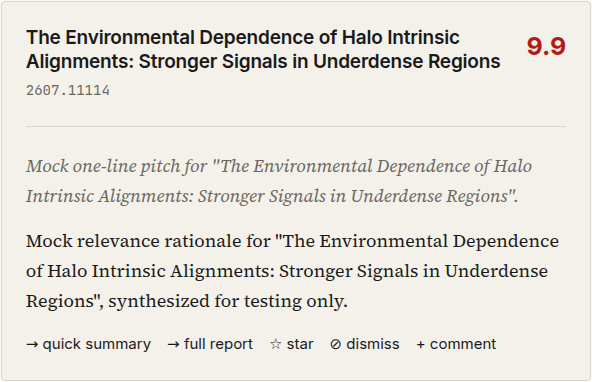
The action row on a briefing paper card (dry-run content). Star, dismiss, and comment are the three feedback controls; quick summary and full report expand cached material.
Briefing paper cards also carry a row of links under the title: abstract · PDF · HTML · alphaXiv. They open the arXiv abstract page, the PDF, arXiv's HTML rendering of the paper (when it has one), and the paper's alphaXiv page.
Filter rows are different: they carry the verdict buttons and a 💬 add comment control, but no star or dismiss — those signals only exist from the score-review gate onward.
Clicking a star toggles it between empty and filled: ☆ star → ★ starred. Click again to remove. Dismiss works the same way. The comment button opens a small text box labelled "Your thoughts on this paper…" with Save and Cancel; saving attaches the note to that paper.
The filter-review gate carries override buttons
When the pipeline pauses at Gate 1, each paper in the filter results has three clickable buttons for the filter's verdict: YES, MAYBE, NO. The current verdict is filled in; the other two are outlined. Clicking a different one switches the paper to that bucket, and a small ⇄ appears on the new choice to mark it as an override.
Each override is recorded as a scope signal. Moving a paper NO → YES tells the refinement flow your profile is probably too narrow in that area; YES → NO suggests it's too broad. MAYBE overrides tell it where the line is ambiguous.
Each click replaces your earlier override for that paper, and moving a paper back to the filter's own verdict removes the override. While the run is past this gate the buttons are disabled. Once the run ends they work again: a change made then is saved straight away as feedback for your profile, and a note above the list says it won't re-run the briefing.
The Feedback panel carries the general-comment input
Every briefing view has a section labelled Feedback below the briefing and its Generation details panel. On the current briefing, the Podcast card sits below it. Near the top of that section is an + Add a comment button that opens a larger text box — "General comment on this week's briefing or your research interests…" — for notes that aren't tied to any one paper.
General comments are distinctive: they go to the refinement flow as profile-level guidance rather than paper-level signal. The flow sees the comment text alongside the briefing it was written against, so a comment like "this week leaned too heavily on interpretability" has context to be interpreted correctly.
How the different types behave
Stars, dismisses, and filter overrides are togglable: only the most recent state matters. If you star a paper, unstar it, then star it again, the refinement flow sees that it's currently starred. Intermediate states are kept in history but don't count as signal on their own.
Paper comments and general comments are different — each one is a separate entry. A second comment doesn't replace the first. If you leave "interesting method" on Monday and "but the evaluation is thin" on Tuesday, the flow sees both, in order.
Answers are latest-wins per question and day: only your current answer counts.
Scoped feedback (bucket / score-review / run) uses latest-wins per scope-dedupe key. If you leave two "score-review" notes for the same run, the second one replaces the first. This is intentional — scoped notes are meant to represent your current assessment of that scope, not accumulate indefinitely.
Practical consequence
Toggle stars and dismisses freely; only the current state counts, so there's no cost to changing your mind. Leave comments a little more deliberately — they accumulate, so their effect on the profile over time is longer-lasting.
Feedback from test runs
Anything you mark while a Dry Run or Minimal API Test is running, and anything you mark on a test-mode briefing, is tagged as test feedback. It reacts to mock output or to the fixed test papers, so it never reaches a real briefing or the refinement flow. The Feedback panel keeps it in a group of its own, described below.
Pending and incorporated
Every event is either pending (not yet reflected in your profile) or incorporated. An event becomes incorporated only when the refinement flow proposes a change that cites it and you accept that change. Events you untick, events behind changes you reject, and everything from a "no change" result stay pending, so the flow sees them again next time. Reverting to an earlier profile revision makes the feedback incorporated since then pending again. Refining over time has the details.
Reviewing your feedback: the Feedback panel
The Feedback panel sits at the bottom of every briefing view, and it's the central place to review everything you've marked across runs. It has four parts.
Counts and the Suggest button
The top of the panel counts the events not yet incorporated into your profile, the total, and, when there are any, the events from test runs. Next to the counts is a Suggest improvements → button that opens the refinement dialog.
When some feedback is pending, the button label carries the count: Suggest improvements (N new) →. The number tells you how much signal is sitting unprocessed.
The same button (with the same suffix logic) appears on the Profile page in its own card, right next to your profile text. Either trigger opens the same flow.
The general comment input
The + Add a comment button expands a larger text box for adding a general comment from the briefing view. This is the only place in the app where general comments can be added.
Filters
Three controls for narrowing the timeline below:
- A Type menu: all types, stars, dismisses, comments, overrides, or notes (the bucket, scoring-round, and run notes).
- A Not yet incorporated toggle: show only pending events.
- A Date range menu: all time, or the past 7, 14, or 30 days.
The timeline
A chronological list of every feedback event, most recent first, in up to three groups: Not yet incorporated, Incorporated into your profile, and From test runs (N) · not used for suggestions. The test-run group is collapsed; Show expands it and Clear test feedback deletes it all in one go.
Each entry shows when you gave it, a small icon for the type (★, ⊘, 💬, 💭, ⇄, 📋, ✓), and either the paper's title (for paper-scoped events) or the comment text (for general ones). Paper-scoped entries also show the paper's score and which briefing they came from.
Every entry has a delete link, which asks once before it removes the event. Comments and notes also have an edit link. An edited entry shows · edited and becomes pending again, because no suggestion has seen the new wording.
The timeline is useful for two things: reminding yourself what you've been marking, and spotting patterns you hadn't noticed. "I keep dismissing interpretability papers" is often a hint the profile is a little off in that area.
How much feedback is enough?
The refinement flow works from the aggregate of everything you've given it — all seven types — so what matters is how much total signal the store holds, not how long you've been using Aparture. A rough guide:
| Aggregate volume | What to expect from the refinement flow |
|---|---|
| Fewer than ~10 events total | Thin. Proposals tend to be vague, or the flow comes back with a "no clear change" reason. |
| ~10–30 events across a mix of types | Usually enough for concrete, defensible edits — especially if a few comments are in the mix. |
| 30+ events including comments | Rich enough that proposals can cite specific reactions and recommend targeted additions or exclusions. |
This isn't a time thing. A heavy first-day session — say a dozen filter overrides, half a dozen stars, and a couple of general comments — gives the flow plenty to work with, so running it that day is fine. Two quiet weeks of barely-engaged briefings might still be too thin.
Diversity matters as much as raw volume. All stars and no dismisses, or all overrides and no comments, leaves the flow with less to reason about than a mix across types. If the store is full but the proposals feel light, adding a general comment or two before running the flow again often helps.
Next
Writing a good profile → — turn the signals you've been marking into a profile the pipeline can reason about more directly.
Also worth reading:
- Go deeper on the refinement flow itself. → Refining over time
- The three pause gates are slowing your runs and you want to adjust them. → Review gates