Reading a briefing
Once you've produced a briefing, the question becomes how to read one efficiently. This page walks through what's on the page and a few patterns for working through it in a few minutes.
A briefing is built around a single practical question: which of the day's papers should you actually open, and which can you safely skip? The layout reflects that — an editorial lead at the top, a handful of thematic groupings below it, and per-paper cards inside each theme — all scaled so you can triage the day without reading every abstract.
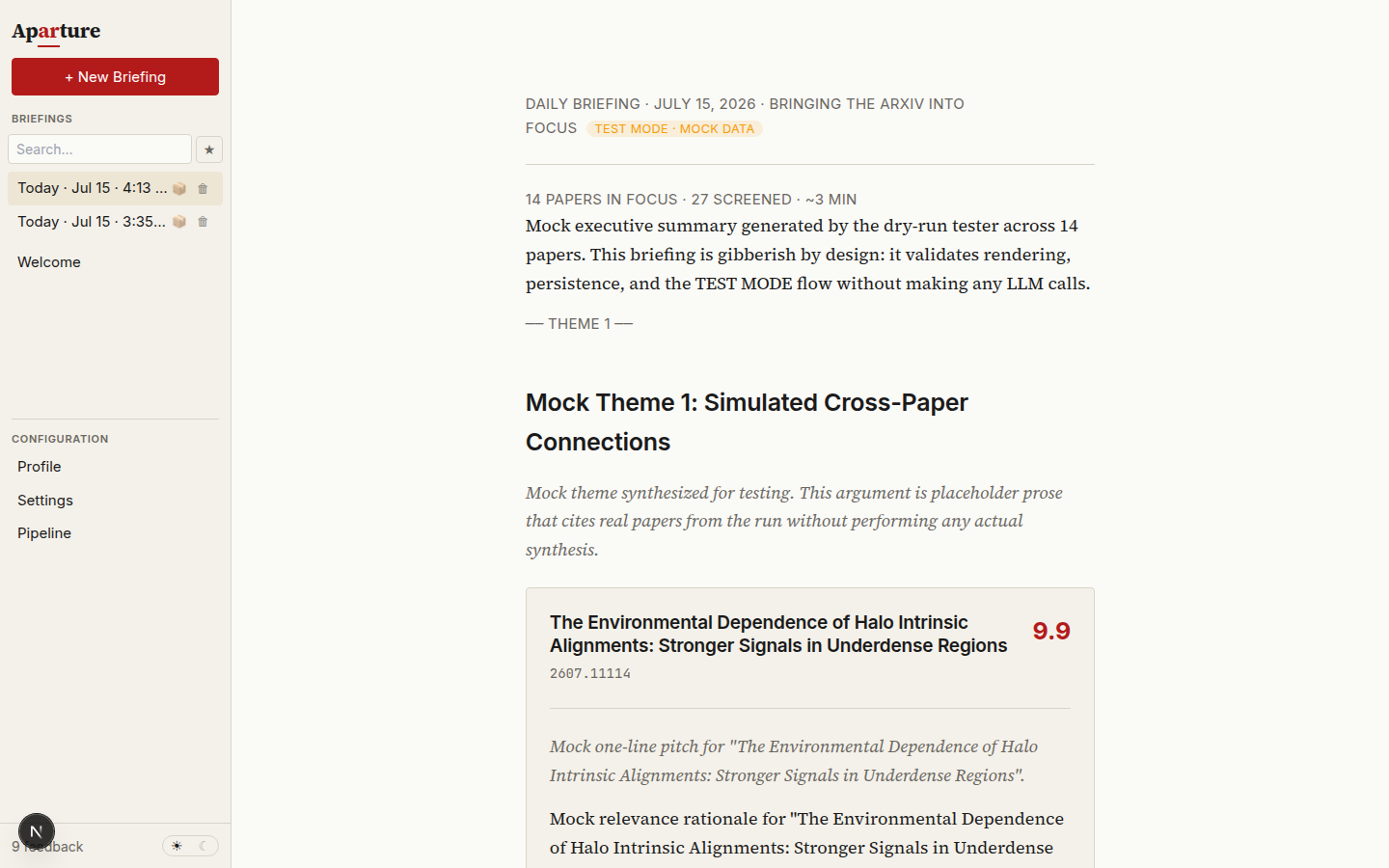
The briefing reading surface, here from a dry run — hence the TEST MODE chip and mock prose. A real briefing has the same layout with your papers.
What's on the page
From top to bottom, a briefing stacks like this:
  ┌────────────────────────────────────┐
  │  Header                            │  date, counts, claims-check status
  ├────────────────────────────────────┤
  │  Executive summary                 │  200-400 word editorial lead
  ├────────────────────────────────────┤
  │  Theme 1                           │
  │    Argument (2-4 sentences)        │
  │     ├─ Paper card                  │
  │     ├─ Paper card                  │
  │     └─ Paper card                  │
  ├────────────────────────────────────┤
  │  Theme 2 … 5, Other papers         │
  ├────────────────────────────────────┤
  │  Notes from the editor             │  up to two questions, some days
  ├────────────────────────────────────┤
  │  Hallucination audit               │  verdict + flagged claims
  │  Generation details ▸              │  how this briefing was made
  └────────────────────────────────────┘
Header
Under the date, one line counts the papers in focus and the papers screened, estimates the reading time, and gives the claims-check status: claims checked, claims check flagged N claims, or claims check did not run. The last two show in amber, so a flagged or unaudited briefing is visible before you read it.
Executive summary
The editorial lead at the top: two to four paragraphs of serif prose. It's the densest summary of the day in the briefing and often enough on its own if you're short on time.
The first paragraph carries the headline — what's the most notable thing in today's papers? If you starred any papers at Gate 3 (the pre-briefing review), those anchor the framing. Middle paragraphs surface thematic clusters and the throughline between them, or note that the day was scattered if it was. The final paragraph almost always lands on a reading recommendation along the lines of "if you read one paper today, make it [arxivId] because…" — usually the clearest pointer in the whole briefing.
Themes
Underneath come two to five themes, priority-ordered so the most important one — the one carrying your highest-scored and most-starred papers — comes first. Each theme is a cluster of papers that share an argument, method, problem, or tension.
Each paper's card appears once, in the first theme that lists it. If a later theme lists the same paper, that theme names it in an "Also in this theme (shown above)" line instead of repeating the card. A paper the briefing didn't place in any theme appears in a final Other papers group rather than disappearing.
A theme opens with a numbered heading deliberately written as an argument or observation rather than a category label (e.g. "1. Interpretability converges on attention heads", not "Interpretability papers"). A short italic argument — two to four sentences — explains why the papers below belong together and what the takeaway is. Where papers within a theme are in tension or build on each other, the argument says so; debates live inside themes rather than in a separate section.
Paper cards
Each theme contains one or more paper cards. This is where individual papers are summarised — a card gives you enough to decide whether to open the PDF:
| Part | What it shows |
|---|---|
| Score badge | A 0.0–10.0 relevance score (one decimal place), more brightly highlighted at 9+ — see how scoring works |
| Title + arXiv ID | Linked to the arXiv abstract page |
| Links | abstract · PDF · HTML · alphaXiv: the arXiv abstract page, the PDF, arXiv's HTML rendering (when the paper has one), and the paper's alphaXiv page |
| One-line pitch | A 15–25 word italic sell — closer to "what would this paper say if it were selling itself in one sentence" than a summary |
| Why it matters | A 2–4 sentence paragraph grounded in your profile and your prior engagement with this paper |
| Action buttons | → quick summary, → full report, ☆ star, ⊘ dismiss, + comment |
The "why it matters" paragraph is where your feedback shapes the output most visibly. Papers you starred at Gate 3 (before synthesis ran) get more extensive treatment; dismissed ones get a brief note acknowledging why they still showed up; everything else gets a short argument tied to your stated interests.
The title and score on a card always come from the pipeline, not from the briefing model: Aparture replaces whatever the model wrote with the paper's real title and score. Two markers mean Aparture repaired the briefing in code because the model's own repair failed: a card whose pitch reads "Added by Aparture: the briefing model left this paper out", and the text [unverified arXiv ID removed] where the prose cited an ID that isn't one of the day's papers. Briefing anatomy lists every check.
Notes from the editor
Some briefings end with up to two short questions under Notes from the editor. They appear only when the day's papers exposed something your profile doesn't settle: a strong paper in an area the profile never mentions, say, or several papers ranked down for a reason the profile is silent about. Each question names what prompted it and offers two to four answers. Tap one to answer; tap it again to take the answer back.
Answers are feedback. They go into the next profile suggestion as evidence, and you still accept or reject the edits it proposes. Later questions see your earlier answers, so nothing is asked twice. Most days there are no questions, and that's normal. To turn them off, clear Ask me up to two questions after each briefing… in Settings → Review & confirmation.
Proposed profile changes
When your recent feedback adds up, the latest briefing also shows a card: N proposed changes to your profile. Review proposals opens the review dialog with them; nothing changes until you accept. See automatic proposals for when they appear.
Going deeper on a single paper
Paper cards are short by design — they're a triage tool, not a replacement for reading. When one catches your attention, there are two ways to go deeper without leaving the briefing.
Quick summary — click → quick summary and an inline block expands beneath the card, showing a roughly 300-word compression of the paper's contribution, method, and result. These run through the quickSummaryModel slot (default gemini-3.5-flash-lite), in parallel with each other, just before synthesis. They're written for you to read; the briefing writer and the audit don't use them. Click again to collapse.
Key figure — when the full read picked a figure, the card shows it, cropped from the paper's PDF, with the paper's own caption underneath. Papers without one (a purely theoretical paper, or a PDF whose caption the crop couldn't find) just show no figure.
Full report — click → full report to open a side panel that slides in from the right and covers roughly the right half of the window. This shows the full per-paper technical report from Stage 4: a multi-paragraph technical summary followed by key findings, methodology, limitations, and a relevance assessment, with its headings and lists rendered. Use it when you want to understand a paper deeply without opening the PDF itself. Close with the X button or by clicking outside the panel.
Expansions are free at read time
Both the quick summary and the full report are generated once during the pipeline run and cached. Opening either costs nothing — no API calls, no waiting — so there's no reason to hesitate before clicking.
Two smaller panels underneath
Below the briefing body sit two small sections that are easy to miss but worth opening at least once.
Hallucination audit
After synthesis, Aparture makes a second LLM call, on the same briefing model, that audits the briefing's claims against each paper's abstract and full report: the same sources the writer was told to ground its claims in. The result appears as a verdict badge, with an optional "flagged claim(s) · click to view" link that expands a list of what the auditor questioned:
| Verdict | Meaning |
|---|---|
| NO | No hallucinations detected. Claims are supported by the source material. What you want to see most of the time. |
| MAYBE | Uncertain. Some claims could be reasonable inferences but the audit couldn't verify confidently. Worth a skim of the flagged list. |
| YES | Claims the audit couldn't find support for. Read the flagged list before trusting the briefing's prose. |
If the audit call fails, Aparture tries it once more. If it still can't run, the briefing is saved unaudited: the header reads claims check did not run, and Generation details gives the reason. An unaudited briefing never shows as checked.
If briefingRetryOnYes or briefingRetryOnMaybe is enabled in Settings (retry-on-YES defaults on, retry-on-MAYBE defaults off), Aparture automatically retries synthesis with a hint about the failed audit. When that happens, the verdict badge shows "(after retry)" — the briefing you're reading is the second attempt, and the audit ran again on it.
The flagged-claims list shows each excerpt, the paper it's about (by arXiv ID), and what the auditor's concern was. Skimming a flag usually tells you whether it's a genuine hallucination or a paraphrase the auditor was unusually strict about.
When to worry
A YES verdict on a major claim in the executive summary is worth reading carefully — that's the part that shapes your reading decisions. A MAYBE on a specific paper detail is usually fine. The underlying papers remain the ground truth; the briefing is a reading aid, not a source.
Generation provenance
Below the audit is a small expandable link: Generation details ▸. Clicking it reveals everything that went into producing this particular briefing:
| Field | What it carries |
|---|---|
| Profile snapshot | The exact profile text in effect when the briefing was generated (truncated at 200 chars, expandable) |
| Models | Model IDs used for the filter, scoring, PDF analysis, and briefing stages |
| Categories | arXiv categories selected for the run, as small badges |
| Filter verdicts | YES / MAYBE / NO counts from the quick-filter stage |
| Settings flags | Whether the filter gate (pauseAfterFilter) and the two retry checks were on or off |
| Hallucination audit | Full verdict, flagged claims, and the auditor's justification prose |
| Generated at | ISO timestamp |
You rarely need this on a fresh briefing. It matters weeks later, when you come back to an archived briefing and want to reconstruct what setup produced it — which model was on the PDF slot that day, what your profile said at the time, whether the hallucination retry fired.
Every briefing is saved permanently as a file in reports/briefings/, and nothing deletes it except you. The sidebar list lives in browser storage, so it is trimmed to a size budget: when it fills, the oldest test runs (dry runs and Minimal API Tests) drop off the list first, then the oldest real briefings. A briefing that drops off the list is still on disk.
A five-minute reading flow
The layout is designed for a few-minute read, not a completionist pass. A pattern that works:
- Start with the executive summary. If it surfaces a specific paper as "if you read one today, make it this", that's your primary target. If it says the day was thin, trust it and skip to theme 1's first card.
- Scan theme 1. That's where the highest-scored papers land, and any papers you pre-starred at Gate 3 have been woven into its framing. Read pitches; for anything that catches you, open the quick summary inline.
- If the quick summary holds up, open the full report. The deeper detail is usually enough to decide whether to open the PDF or move on.
- Star anything interesting you won't read now. Stars are tied to the paper by arXiv ID and persist across runs, but in practice they don't retroactively change the briefing you're reading (that's already been synthesised) and arXiv papers rarely reappear in later runs. Their real job is to accumulate as signal for the refinement flow, which is how feedback on this briefing eventually shapes future ones.
- Dismiss deliberately. A dismiss tells the system "stop bringing me these", so use it when a paper is genuinely not a fit — not when you're just out of time today.
- Skip the rest. Working through every paper isn't the intended use — triage is.
Feedback you give here is the same feedback you give at Gate 3
Stars, dismisses, and comments are all keyed per paper, not per run. The same controls appear on the pre-briefing review gate (Gate 3) and on the paper cards in the briefing itself — the difference is just timing relative to synthesis. Feedback given at Gate 3 shapes the briefing that's about to be written; feedback given while reading mainly accumulates as signal for the refinement flow, which is the actual path by which today's feedback shapes tomorrow's briefings (via a refined profile). Giving feedback covers the full mechanics.
Next
Giving feedback → — the mechanics of stars, dismisses, comments, and filter overrides, and what each one actually does to the next run.
Also worth reading:
- You want the system view — how the briefing is built from prompts and schema. → Briefing anatomy
- You want to tune what the briefing prioritises — model choice, thresholds, batch sizes. → Tuning the pipeline
- The briefing keeps missing things you care about, or including things you don't. → Writing a good profile and Refining over time