
Tutorials / Choosing an engine
Choosing an engine
binference offers several engines that compute the same posterior. This tutorial runs all of them on one problem, and compares their accuracy, speed and diagnostics. NUTS, which is exact for any prior, is the reference.
import time
import warnings

import matplotlib.pyplot as plt
import numpy as np

import binference

bins = binference.Bins.linear(0, 3, 20)
mock = binference.simulate.mock_1d(1500, bins, noise=(0.1, 0.3), rng=11)
lk = mock.likelihoods
Running the engines
fits, times = {}, {}
for method in ["nuts", "laplace", "vb", "bootstrap"]:
    t0 = time.perf_counter()
    with warnings.catch_warnings():
        warnings.simplefilter("ignore")      # we look at the diagnostics ourselves below
        fits[method] = binference.infer(lk, method=method, rng=1, n_samples=500, check=False)
    times[method] = time.perf_counter() - t0
t0 = time.perf_counter()
est = binference.infer(lk, method="map")
times["map"] = time.perf_counter() - t0
print({k: f"{v:.1f} s" for k, v in times.items()})
{'nuts': '29.4 s', 'laplace': '0.1 s', 'vb': '0.1 s', 'bootstrap': '1.4 s', 'map': '0.0 s'}
Accuracy against the reference
The engines agree on the means and differ most in the standard deviations.
ref = fits["nuts"]
fig, axes = plt.subplots(2, 1, sharex=True)
fig.set_figheight(5.8)
zc = bins.centers
styles = {"laplace": "s", "vb": "^", "bootstrap": "D"}
for m, mk in styles.items():
    axes[0].plot(zc, fits[m].mean - ref.mean, mk, ms=6, label=m)
    axes[1].plot(zc, fits[m].std / ref.std, mk, ms=6, label=m)
axes[0].plot(zc, est.rho - ref.mean, "x", color="k", ms=7, mew=2, label="map")
axes[0].axhline(0, color="0.6", lw=1)
axes[1].axhline(1, color="0.6", lw=1)
axes[0].set(ylabel="mean − NUTS")
axes[1].set(xlabel="z", ylabel="sd / NUTS sd", yscale="log")
axes[1].set_yticks([0.1, 0.2, 0.5, 1, 2], ["0.1", "0.2", "0.5", "1", "2"])
axes[1].minorticks_off()
fig.legend(*axes[0].get_legend_handles_labels(), loc="outside lower center", ncol=3);
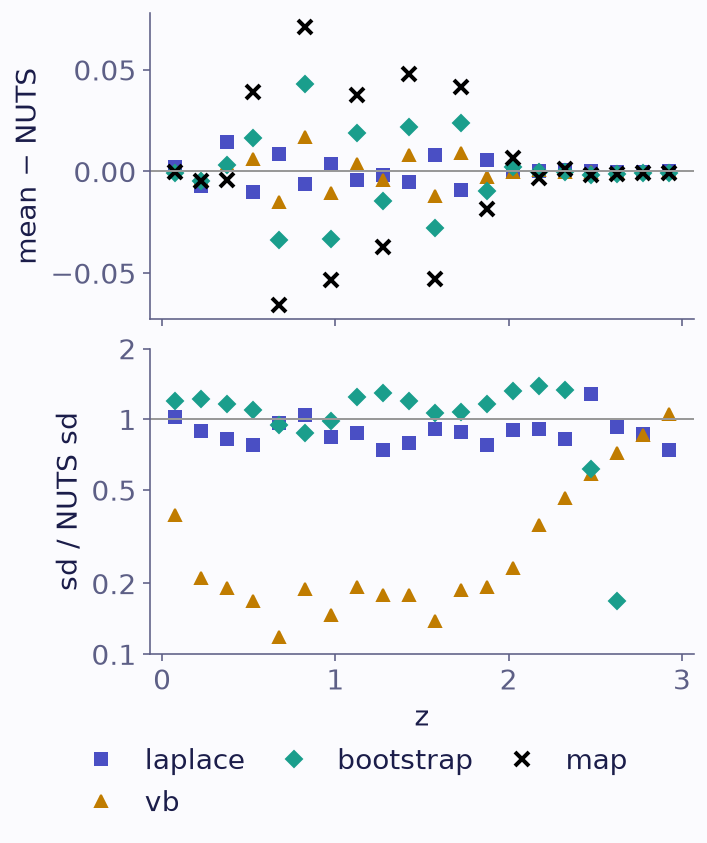
Each engine’s posterior mean minus the NUTS mean (top), and its posterior standard deviation over the NUTS one (bottom), per bin. The MAP estimate has no standard deviation.
Mean-field VB is far too narrow. It ignores the coupling between the objects’ bins and the population, which is strong when likelihoods are broad. binference always flags its results as approximate.
Laplace is approximate, and its Pareto k-hat \(\hat k\) says how far to trust it.
The bootstrap describes the spread of the MAP estimate over resampled catalogues. That is a different quantity from the posterior uncertainty.
MAP gives a single point. With a flat prior it can sit exactly on zero in some bins.
print("Laplace k-hat:", round(fits["laplace"].info["k_hat"], 2),
      "approximate:", fits["laplace"].approximate)
print("VB approximate:", fits["vb"].approximate)
print("MAP optimality gap:", f"{est.kkt_gap:.1e}")
Laplace k-hat: 1.12 approximate: True
VB approximate: True
MAP optimality gap: 4.5e-15
Gibbs on this problem
Gibbs is exact too, but on this problem it mixes slowly. Every sampled result
carries diagnostics, and binference.infer warns when they look bad. A Gibbs run with
the default settings triggers a warning:
with warnings.catch_warnings(record=True) as caught:
    warnings.simplefilter("always")
    gibbs = binference.infer(lk, method="gibbs", rng=1)
print(caught[0].message if caught else "no warnings")
model = binference.PopulationModel(lk)
print("fraction of missing information:", round(model.missing_information(est.rho), 3))
Diagnostics: max R-hat = 1.246 > 1.01; min bulk ESS = 12 (3.0 per chain < 100); min tail ESS = 34 (8.7 per chain < 100). Hint: Gibbs mixes slowly when likelihoods are broad compared with the bins (missing information 1.00: autocorrelation time over 1000); run longer or use method='nuts'.
fraction of missing information: 0.995
The fraction of missing information printed above is close to one, which is why Gibbs mixes slowly here (Gibbs sampling). The trace of the bin with the largest R-hat shows it:
worst = int(np.argmax(gibbs.diagnostics["rhat"]))
gibbs.plot_trace(idx=[worst]);
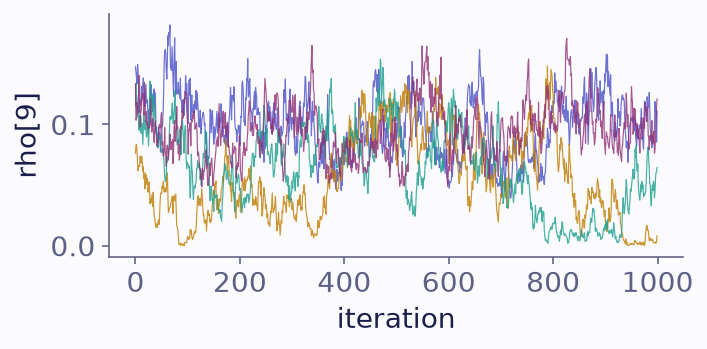
The fraction in the bin with the largest R-hat, over the iterations of each of the four chains of the Gibbs run.
The four chains have not mixed. Run much longer, or use NUTS.
With narrow likelihoods every object’s bin is nearly known, and Gibbs is the faster sampler. Both runs below pass their diagnostics; the comparison is in effective samples per second:
narrow = binference.simulate.mock_1d(1500, bins, noise=(0.01, 0.03), rng=11)
per_second, narrow_fits = {}, {}
for m in ["nuts", "gibbs"]:
    t0 = time.perf_counter()
    narrow_fits[m] = r = binference.infer(narrow.likelihoods, method=m, rng=1, n_samples=500,
                                          check=False)
    dt = time.perf_counter() - t0
    per_second[m] = r.diagnostics["ess_bulk"].min() / dt
    print(f"{m:6s} {dt:5.1f} s, min ESS per second: {per_second[m]:8.1f}")
nuts    10.5 s, min ESS per second:     48.4
gibbs    0.9 s, min ESS per second:   1032.4
The engines guide says which engine to use
when, and what method="auto" chooses.