
Tutorials / A two-dimensional population
A two-dimensional population
Nothing in binference is specific to one dimension. Bins can be a grid in any number of dimensions, such as a colour–magnitude diagram or a plane of mass and mass ratio. This tutorial infers a two-dimensional population with a curved ridge, like a stellar sequence, from measurements that are noisy in both coordinates. The two coordinates are \(z_1\) and \(z_2\).
import matplotlib.pyplot as plt
import numpy as np
from matplotlib.colors import LinearSegmentedColormap, to_rgb

import binference
from binference.plotting import SAMPLE_COLOR

grid = binference.Bins.grid(np.linspace(0, 1, 13), np.linspace(0, 1, 13))   # 12 x 12 cells
rho_true = binference.simulate.population(grid, "banana")   # cell fractions of the ridge
mock = binference.simulate.mock_2d(3000, grid, density=rho_true, noise=(0.02, 0.06), rng=8)
lk = mock.likelihoods
print(grid, grid.shape, lk)
Bins.grid(shape=(12, 12), range=[(0, 1), (0, 1)]) (12, 12) Likelihoods(N=3000, K=144, dense, bins=Bins.grid(shape=(12, 12), range=[(0, 1), (0, 1)]))
Each object’s likelihood is a two-dimensional Gaussian over the grid. Its errors vary
from object to object and between the two axes. The likelihood matrix has one
column per cell, with the last axis varying fastest. grid.unflatten and grid.flatten
convert between the two layouts.
The mock draws the true values uniformly within each cell, as the model assumes. The ridge is narrower than a cell, so true values drawn from the continuous ridge would bias the fit toward a sharper ridge (bins that are too coarse).
obs = mock.measurements["mean"]
e1, e2 = grid.edges
c0, ground = np.array(to_rgb("C0")), np.array(to_rgb(plt.rcParams["axes.facecolor"]))
ramp = LinearSegmentedColormap.from_list("ramp", [0.15 * c0 + 0.85 * ground, c0])
fig, axes = plt.subplots(2, 1)
fig.set_figheight(7.2)
im = axes[0].pcolormesh(e1, e2, grid.unflatten(mock.truth.rho / grid.volumes).T, cmap=ramp)
fig.colorbar(im, ax=axes[0], label="density")
axes[0].set_title("true population", loc="left")
axes[1].scatter(obs[:, 0], obs[:, 1], s=3, color=SAMPLE_COLOR, alpha=0.4, lw=0)
axes[1].set(xlim=(0, 1), ylim=(0, 1))
axes[1].set_title("measured values", loc="left")
for ax in axes:
    ax.set(xlabel="$z_1$", ylabel="$z_2$");
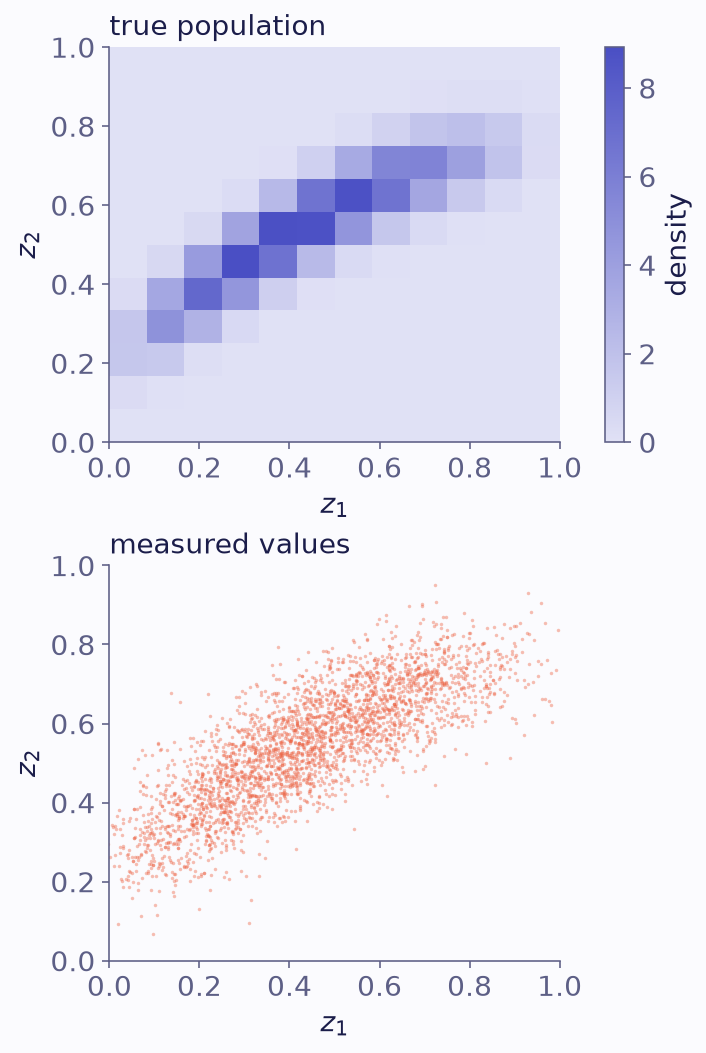
The true population density on the 12 by 12 grid (top) and the measured values of the 3000 objects (bottom).
A smooth population on the grid
A Gaussian-process prior with one length scale per axis lets the data decide how smooth
the population is in each direction. This is the largest fit in the tutorials, so
n_jobs=-1 runs the four NUTS chains in parallel processes. They use the same
random streams as a serial run.
result = binference.infer(lk, binference.priors.LogisticGP(n_basis=10), rng=1, n_samples=300,
                          n_warmup=300, n_jobs=-1)
print(result)
print({k: np.quantile(v, [0.16, 0.5, 0.84]).round(2)
       for k, v in result.info["hyperparameters"].items()})
PopulationResult(method='nuts', kind='fractions', K=144, n_chains=4, n_draws=1200)
{'amplitude': array([4.3 , 5.06, 6.1 ]), 'length_scale_0': array([0.3, 0.4, 0.5]), 'length_scale_1': array([0.15, 0.22, 0.31])}
Ten sines per axis (n_basis=10) keep the fit small; the default, one sine per bin,
would give 144 modes.
fig, axes = plt.subplots(2, 1)
fig.set_figheight(7.2)
result.plot(ax=axes)
for ax in axes:
    ax.set(xlabel="$z_1$", ylabel="$z_2$");
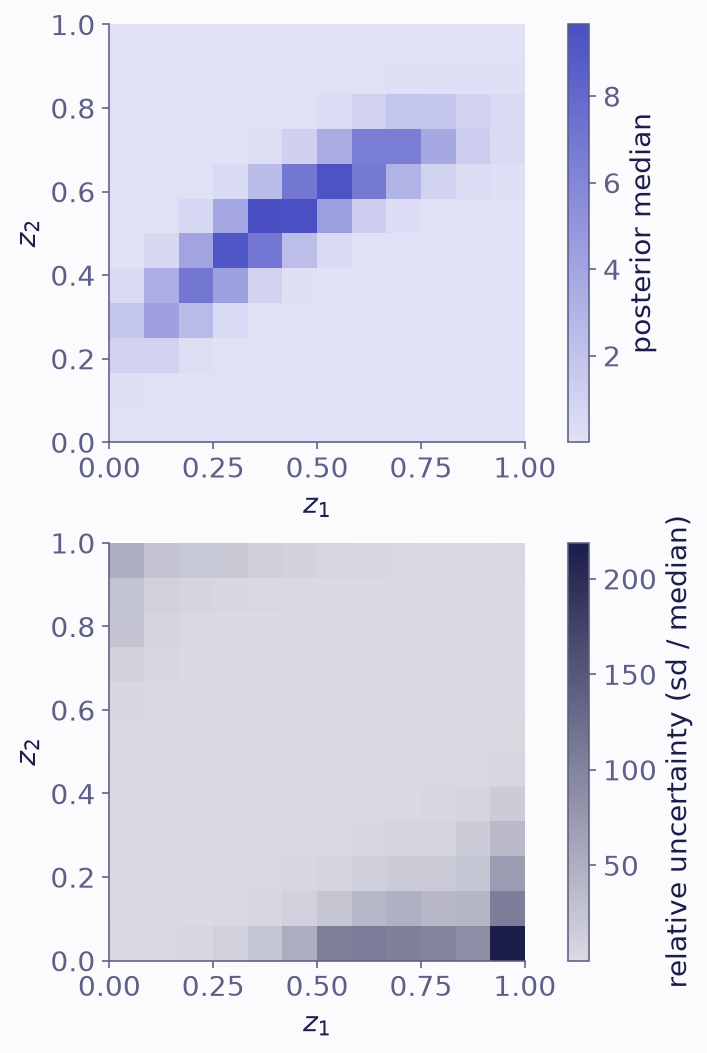
The posterior median density (top) and the relative uncertainty of each cell, its standard deviation over its median (bottom).
The relative uncertainty is smaller along the ridge than away from it, where there are few objects:
rel = result.samples.std(axis=0) / np.median(result.samples, axis=0)
ridge = mock.truth.rho > np.quantile(mock.truth.rho, 0.75)    # the densest quarter of cells
print(f"median relative uncertainty: {np.median(rel[ridge]):.2f} on the ridge, "
      f"{np.median(rel[~ridge]):.2f} elsewhere")
median relative uncertainty: 0.09 on the ridge, 2.12 elsewhere
Derived quantities across the grid
Every derived quantity is computed per draw, so the correlations between cells carry through. Here are the marginal distribution along \(z_1\), and the mean \(z_2\) at each \(z_1\), which traces the ridge:
draws = result.samples.reshape(-1, *grid.shape)        # (n_draws, n_1, n_2)
marg_1 = draws.sum(axis=2)                              # fraction per z1 column
c2 = grid.centers.reshape(*grid.shape, 2)[0, :, 1]      # z2 at the cell centres
mean_2 = (draws * c2).sum(axis=2) / marg_1              # mean z2 in each z1 column

true = grid.unflatten(mock.truth.rho)
fig, axes = plt.subplots(2, 1, sharex=True)
fig.set_figheight(5.1)
for ax, d, t, lab in [(axes[0], marg_1, true.sum(axis=1), "fraction"),
                      (axes[1], mean_2, (true * c2).sum(axis=1) / true.sum(axis=1), "mean $z_2$")]:
    lo, med, hi = np.quantile(d, [0.16, 0.5, 0.84], axis=0)
    ax.fill_between(e1, np.append(lo, lo[-1]), np.append(hi, hi[-1]), step="post",
                    color="C0", alpha=0.3, lw=0, label="68% interval")
    ax.step(e1, np.append(med, med[-1]), where="post", color="C0", label="median")
    ax.step(e1, np.append(t, t[-1]), where="post", color="k", ls="--", label="truth")
    ax.set(ylabel=lab)
axes[1].legend(loc="lower right")
axes[1].set_xlabel("$z_1$");
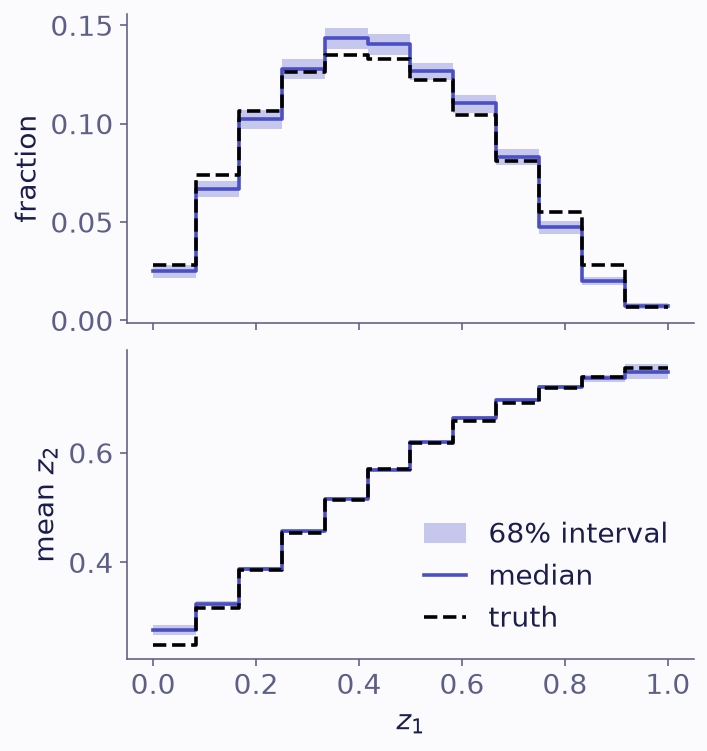
The fraction of the population in each column of z1 (top) and the mean z2 in each column (bottom), with 68% bands. The truth is dashed.
The bands of the column fractions are narrow. The smoothness prior shares information between neighbouring columns, so the bands are narrower than the counting noise of 3000 objects, and half of the columns miss the truth:
t1 = true.sum(axis=1)
lo1, hi1 = np.quantile(marg_1, [0.16, 0.84], axis=0)
shot = np.sqrt(t1 * (1 - t1) / lk.N)                    # counting noise of each column
print(f"columns whose 68% band holds the truth: {np.sum((t1 >= lo1) & (t1 <= hi1))} of 12")
print(f"band sd over counting noise, median: {np.median(marg_1.std(axis=0) / shot):.2f}")
columns whose 68% band holds the truth: 6 of 12
band sd over counting noise, median: 0.82
A smoothness prior is only as good as the smoothness it assumes; check it as in Validating an analysis.
For larger grids, the performance guide shows how to store likelihoods sparsely, run chains in parallel and get a quick estimate first.